

TL;DR: Most service businesses should start Google Ads with $1,500 to $2,500 a month in ad spend. Not because it is a magic number, but because that is what it costs to buy enough clicks for real data in a competitive trade. The right budget for you comes from three numbers: your average job value, your close rate, and what that math says you can pay per lead. This guide walks the whole calculation.
A plumber asked me this on a call last month, and I gave him the answer nobody likes: the businesses that ask “how much should I spend” are usually asking the wrong question. The right question is “what is a lead worth to me, and how many do I want.” Answer that and the budget calculates itself.
But I know why you searched this. You want a number. So let’s start there, and then I’ll show you the math that produces your number instead of a generic one.
The short answer, if you just want a number
For most service businesses in the US running Search campaigns, the realistic starting range is $1,500 to $2,500 a month in ad spend. Established businesses in competitive metros usually settle between $2,500 and $5,000. Emergency trades in big cities (plumbing, HVAC, restoration) often run more, because their clicks cost more and their jobs are worth more.
Here is the same answer sorted by situation:
- Brand new to Google Ads, smaller market: $1,500 to $2,000 a month
- New account, competitive metro, emergency trade: $2,000 to $3,000 a month
- Working account you want to grow: $2,500 to $5,000 a month
- Proven account losing impression share to budget: $5,000 and up, raised in steps
Notice what’s not on that list: anything under $1,000 a month. I’ll explain why lower budgets usually fail in a minute, and it isn’t a sales pitch. It’s arithmetic.
The back-of-a-napkin formula that beats every generic answer
Your budget should come from your economics, not from what some blog says the “average small business” spends. The average small business is not your business. Four numbers get you there, and you can do this on an actual napkin.
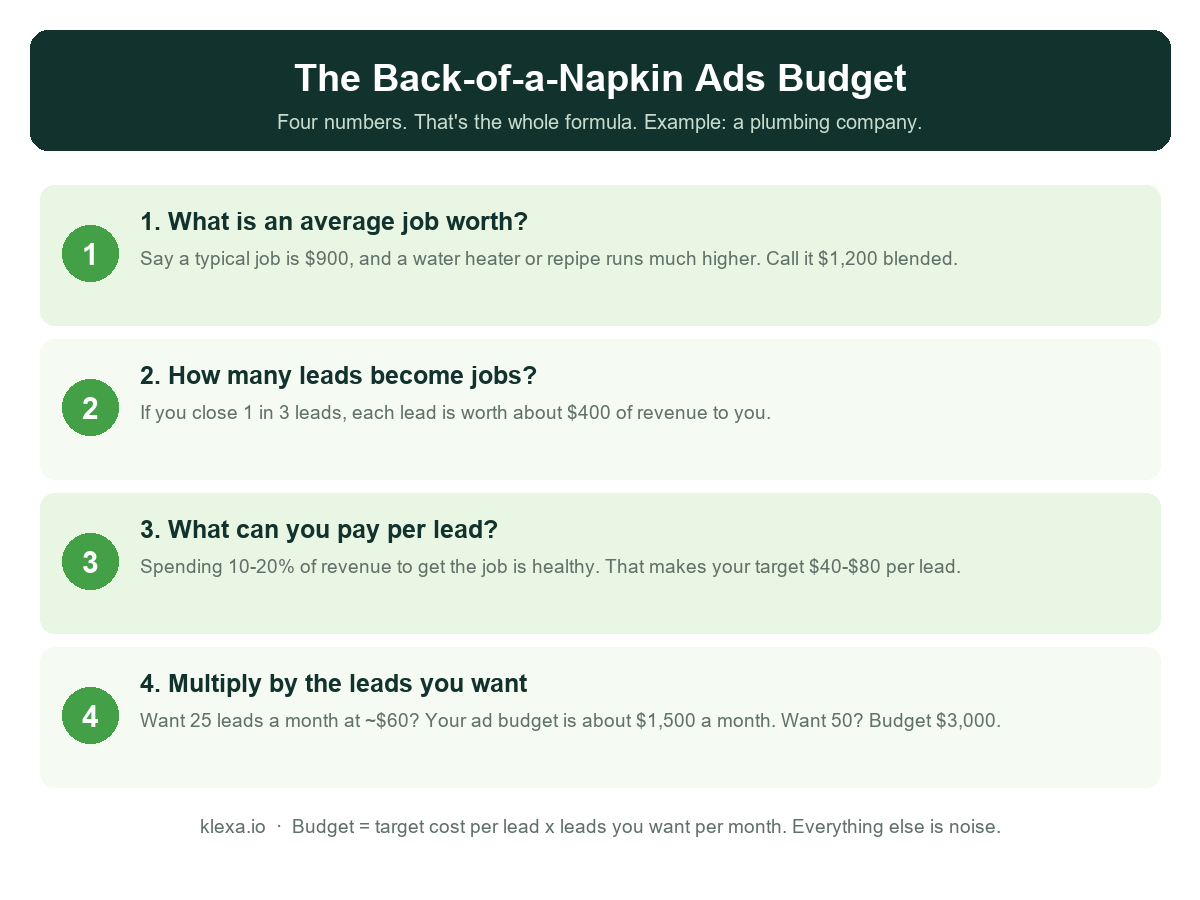
Step one: what is an average job worth? Not your biggest job. The blended, honest average across a normal month. A plumbing company might land at $1,200 once water heaters and repipes are mixed in with drain calls. A remodeler might be $25,000. A commercial rigging outfit might be far beyond that.
Step two: how many leads become jobs? If you close one in three leads, each lead carries about a third of a job’s value. Most service businesses close somewhere between one in five and one in two, and most owners guess higher than reality until they actually count. Count.
Step three: what can you afford to pay for a lead? A healthy range for most trades is 10 to 20 percent of job revenue going to the cost of winning that job. Our plumbing example: $1,200 job, close one in three, so a lead is worth about $400 in revenue. Paying $40 to $80 for it leaves plenty of margin.
Step four: multiply by the leads you want. Twenty five leads a month at $60 each is $1,500. Fifty leads is $3,000. If you would rather not do the arithmetic yourself, our Google Ads budget calculator runs these four numbers for you and gives you the daily figure to enter. That’s your budget, derived from your own numbers, and it also tells you what success looks like: if the account delivers leads at or under your target cost, the budget is earning its keep. If you want the exact wiring behind counting those leads properly, our conversion tracking guide covers it end to end, and it’s the first thing we fix on every account.
Real numbers from our own client book, so you can sanity-check the ranges: a brand new plumbing account we built produced 89 tracked leads at $92 each in its first 90 days. A crane and rigging client we’ve run for years generates leads at $197, down from $273, in a trade where one job is worth many multiples of that. Different trades, different economics, same formula.
What clicks actually cost in the trades
Budgets fail when owners assume clicks cost a dollar or two. In the service trades, they don’t. Google Search pricing is an auction, and your competitors bid aggressively because the jobs are valuable.
Rough ranges we see across US service accounts right now: general contractor and remodeling searches often run $8 to $25 a click. Plumbing and HVAC sit around $15 to $50, with emergency searches at the top of that band. Water damage restoration can blow past $80 a click in big metros, because a single insurance job is worth five figures. Roofing lives in the $15 to $40 range depending on storm season.
Do the arithmetic with your budget. At $500 a month in a market where clicks cost $20, you are buying 25 clicks. A month. That’s roughly six clicks a week, and if your landing page converts a typical 10 to 15 percent of them, you’re generating two or three leads a month. One bad week of junk clicks and your entire month’s data is noise. This is the arithmetic reason small budgets fail. It isn’t that Google “doesn’t work” at $500 a month. It’s that 25 clicks can’t tell you anything, and they can’t feed a bidding algorithm either.
The minimum budget that actually works
Here’s the floor I give owners, and the reasoning, so you can adjust it for your market.
A Search campaign needs roughly 15 to 30 clicks a week before anyone, human or algorithm, can tell signal from noise. Google’s Smart Bidding gets meaningfully better once conversions arrive steadily, and a campaign scraping together two leads a month never gives it enough to learn from. So the minimum viable budget is really a function of your click prices:
- Clicks at $10: about $600 to $1,200 a month can work in less competitive markets
- Clicks at $20: you need $1,200 to $2,500
- Clicks at $40 and up: under $2,500 a month, you’re sending one soldier to a gunfight
One mechanical detail that trips up almost everyone. Google budgets are set per day, and Google is allowed to spend up to twice your daily budget on a heavy search day. It balances out across the month, so you’ll never pay more than about 30.4 times your daily number, but the first time an owner sees a $100 day on a $50 daily budget they think something’s broken. Nothing’s broken. Set your daily budget at your monthly number divided by 30.4 and let it breathe, or let the calculator do that division for you.
And if a $1,500 monthly budget genuinely isn’t available yet, my honest advice is not to run a $400 version of the same plan. Narrow the war instead. One service, your highest-value one. One tight geography. Call-focused ads during business hours only. A $700 budget concentrated on “water heater replacement” in one suburb can work. The same $700 spread across every plumbing keyword in a metro cannot.
The three stages every budget should move through
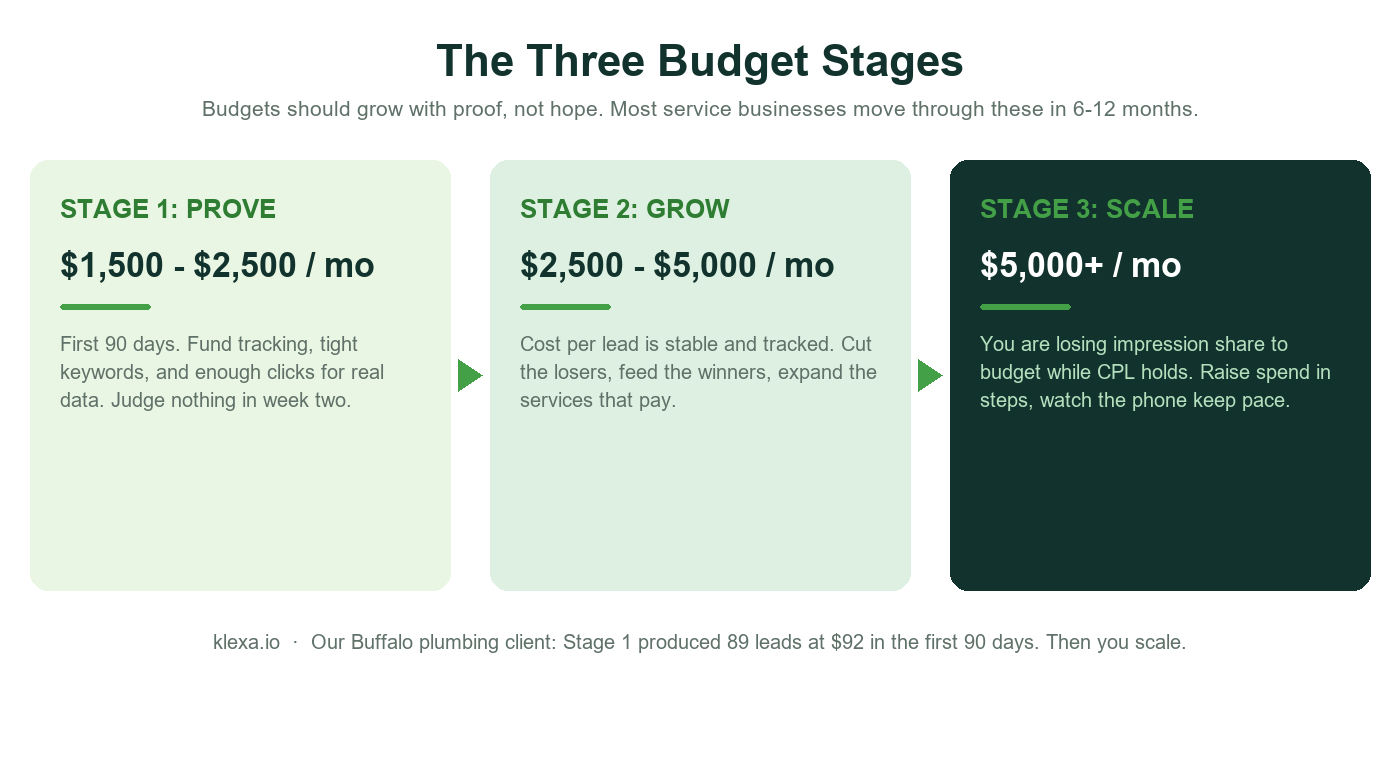
Stage one is proving, and it takes about 90 days. The budget’s job here is not profit. It’s data. You’re funding enough clicks to learn which searches produce actual phone calls, which areas book jobs, and what a lead genuinely costs you. Judge nothing in week two. The Buffalo account I mentioned earlier hit $92 leads inside its first 90 days, but the first three weeks looked ordinary, because the machine was still learning who converts.
Stage two is growing. Cost per lead is stable and properly tracked. Now the budget’s job is concentration: cut the keywords and hours that eat spend without booking work, and feed the campaigns that produce. This is where most of the improvement in our rigging account came from, $273 leads ground down to $197 over months of pruning, not from any single clever trick.
Stage three is scaling, and it has a tell. Open your campaign and look at a metric called Search lost impression share (budget). That’s Google telling you “people searched for exactly what you sell, and your ads sat out because the day’s budget was gone.” When that number is meaningful while your cost per lead holds steady at target, more budget buys more of the same leads. Raise spend 20 to 30 percent at a time, let it settle for a couple of weeks, and check that the phone keeps pace. If leads climb but bookings don’t, the leak is downstream of the ad account, and our conversion optimization guide is where to look next.
Where service business budgets actually leak
Before you raise any budget, plug the holes in the current one. We audit accounts for a living, and the same three leaks show up over and over.
Leak one: junk searches. Job seekers, DIY researchers, price tourists, students. “Plumbing jobs near me” and “how to fix a water heater” click service ads all day and never book anything, and every one of those clicks costs the same as a real customer’s. An unmanaged account routinely bleeds 20 to 30 percent of its budget here. The fix is a negative keyword list that grows weekly, and we published the whole method, starter list included, in our negative keywords guide.
Leak two: broken measurement. If calls and form fills aren’t counted correctly, Google optimizes toward cheap clicks instead of customers, and your “cost per lead” is fiction in both directions. You cannot budget what you cannot measure. This is why tracking comes first on every account we touch, before a dollar of scaling.
Leak three: nobody is home. Search behavior drifts, competitors change bids, fresh junk arrives weekly. An account untouched for three months quietly reverts to waste, at any budget. That ongoing work is what proper Google Ads management actually consists of, and if you want to check your own account’s health first, run through our Google Ads audit checklist. It takes about fifteen minutes.
Budget benchmarks by trade
Same formula, different economics. Here’s how the starting ranges tend to shake out across the trades we work with, assuming a competitive US metro and a properly built account. Treat these as calibration, not gospel.
Plumbing and HVAC: $2,000 to $4,000 a month. Emergency intent means expensive clicks but fast decisions, someone with a burst pipe hires within the hour. Call-only campaigns carry a lot of the load, and after-hours coverage is often where the best jobs hide. Our full playbooks for both are on the plumbing and HVAC pages.
Roofing: $2,000 to $5,000, with a storm reserve. Ordinary months run steady, but hail or wind events double search demand overnight. The smart structure keeps a storm-response campaign built and paused, with budget held back to activate it within hours. Replacement keywords justify far higher spend than repair keywords, because the jobs are 10x the size.
Electrical and pest control: $1,500 to $3,000. Slightly cheaper clicks than plumbing, steadier demand. Pest control has a wrinkle worth budgeting for: recurring plans mean the lifetime value of one customer dwarfs the first visit, so you can afford a higher cost per lead than the first invoice suggests.
Landscaping and remodeling: $1,500 to $4,000, heavily seasonal. Project-based trades with long decision cycles. The clicks are moderate, but buyers research for weeks, so budget here has to fund patience, and the landing page does more of the selling.
Restoration: $4,000 and up. The most expensive clicks in home services, because a single insurance-funded water or fire job can be worth $20,000 or more. Nobody should enter this auction with a small budget; concentrated spend during and after weather events beats a thin year-round trickle.
Seasonality: when to flex the budget instead of setting it once
The single most common budgeting mistake we see in the trades is treating the monthly number as a constant. Service demand is a wave, and a flat budget guarantees you’re overspending in the trough and rationed during the peak, which is precisely backwards.
Think of it as a planned annual budget, deployed unevenly. An HVAC company might run $2,000 a month in the shoulder seasons and push $4,000 to $5,000 during the first heat wave and the first cold snap, because those two weeks produce a quarter of the year’s emergency revenue. A landscaper does the reverse of a snow company: heavy March through June, light in the winter, never fully dark. Roofers hold a reserve for storm weeks. Even plumbers, the steadiest trade of the bunch, see January freeze spikes worth leaning into.
Two rules make seasonal flexing safe. First, raise budgets a week or two before your season starts, not the day it arrives, because the account needs a running start and the auction gets expensive once every competitor piles in. Second, never go fully dark in the off-season. Pausing an account for three months throws away its momentum and its data freshness; dropping to a maintenance budget keeps the machine warm and keeps your brand terms defended for a few hundred dollars a month.
Questions owners actually ask about budget
“Is $10 a day enough to try it out?” Honestly, in most trades, no. $300 a month buys maybe 10 to 20 clicks in a competitive market, which is a coin flip’s worth of data. You won’t learn whether Google Ads works for you; you’ll learn what spending $300 feels like. If that’s genuinely the ceiling for now, narrow to one service in one suburb as described above, or wait until $1,500 a month is comfortable.
“Google keeps telling me to raise my budget. Should I?” Google’s in-account recommendations are a mix of useful advice and prompts that mostly increase your spend, and the “increase your budget” nudge is the purest example of the second kind. Ignore it unless your numbers agree: stable cost per lead, meaningful search impression share lost to budget, and capacity to handle more work. And check that auto-apply recommendations are switched off while you’re in there. Accounts wake up with broad keywords they never chose that way.
“How long until the budget pays for itself?” A properly built account in a service trade usually shows its true cost per lead within 60 to 90 days. Profitability depends on your close rate and job values from there. What I tell owners: if tracking is correct and the account is managed weekly, you’ll know by day 90 whether the math works, and you’ll know with real numbers instead of vibes. If nobody can show you those numbers at day 90, the problem isn’t the budget.
“Should I split the budget between Google and Facebook?” For emergency and intent-driven trades, no. Someone with a flooded basement searches; they don’t scroll. Put the full budget where the intent is until it’s genuinely maxed out, meaning you’re capturing the available searches at a profitable cost per lead. Social spend makes sense later, for remodelers and project trades with long consideration windows, or for staying visible between seasons.
“My budget runs out by 2pm. Good sign or bad?” It’s a signal worth reading, not a badge of honor. It can mean genuine demand outrunning your budget, which is the stage-three scaling signal. But before raising anything, check what ate the morning budget. If the search terms report shows junk clicks, you don’t have a budget problem, you have a filtering problem, and more money would just buy more junk. Clean first, then scale.
Don’t forget the other line item: management
Ad spend is what Google charges you. Managing the account is a separate cost, whether you pay it in your own evenings or in an agency fee, and pretending it’s free is how “cheap” accounts get expensive.
Running it yourself is a real option at stage one if you have the hours and the patience for the weekly ritual: search terms, negatives, bids, budget flow. Plenty of owners do it well for a while. The trap is that “for a while” quietly becomes “not since spring,” and an unwatched account doesn’t hold still, it decays.
If you hire it out, the fee only makes sense when it pays for itself in recovered waste and better leads. Our rundown of HVAC Google Ads agencies covers what to ask before you sign with anyone. A manager who saves you 25 percent of a $3,000 spend and lifts lead quality has covered a reasonable fee before any growth. One who sends a monthly PDF of impressions has not. Whatever you decide, keep ownership of your own ad account. Month to month, full access, walk anytime. That’s how we structure it, and it’s the arrangement I’d demand from anyone, us included.
The bottom line
Start from your job value and close rate, not from someone else’s average. Fund enough clicks to generate real data, which in most trades means $1,500 a month or more. Spend the first 90 days proving, not judging. Plug the leaks before raising the spend, and raise it only when Google tells you demand is being left on the table while your cost per lead holds.
And measure everything, because every step of this only works if the lead counts are true.
If you’re already spending and honestly don’t know whether the budget is earning its keep, that’s a measurable question, not a mystery. Our free check below reads your setup the way we’d read it in an audit and gives you a plain-English answer in about two minutes.
Is your current budget actually working?
Free 2 minute check for business owners. See where the spend leaks. No login, no obligation.