
TL;DR: Negative keywords are the only Google Ads lever that purely cuts waste. Read your search terms report weekly, block the six click thieves, and grow a shared negative list a handful of terms at a time. The refund starts next month.
Last month I opened the search terms report on a plumbing account and the third line down was “plumbing jobs near me.” Eleven clicks. The account had paid for every one of them, and every single click was a person looking for work, not a plumber. Keep scrolling and it got worse. “How to fix a running toilet.” Someone searched “free plumbing course” and clicked an ad. An ad! For an emergency plumber!
This is the leak I see most often. Not the biggest, that one’s broken conversion tracking, but junk searches are the leak owners can actually see with their own eyes, which is maybe why it makes them the angriest. A guy who’s been paying 2,400 dollars a month suddenly realizes a chunk of it went to students and job hunters, going back who knows how long. Rough evening.
The fix has been sitting in Google Ads the whole time. Negative keywords.
What a negative keyword does
A regular keyword tells Google when to show your ad. A negative does the opposite. Add “jobs” as a negative on that plumbing account and the ad simply stops showing to anyone whose search contains the word. No more paying for job seekers. Done.
What I like about negatives, and I don’t say this about much in Google Ads, is that they only cut in one direction. New ad copy might work or might not. A bid change can backfire. But nobody searching “diy sewer line repair” was ever going to hire you, so blocking it costs nothing and saves the click fee. Every time.
This got worse recently, not better
Five years ago exact match meant exact. It doesn’t anymore. Phrase match now behaves like broad match used to, and Google leans on you to go broader still, with broad match defaults and AI-driven targeting in every other interface update. Their pitch is that the machine finds buyers you’d have missed. Sometimes true. It also finds every homework assignment and price checker whose search is vaguely near your service, and you fund the experiment.
You can’t tighten the matching back to what it was. That option’s gone. The block list is the control you still own, and an account without one just absorbs Google’s expansion on its own dime. I think of negatives as the fence around a matching system that keeps growing, and most of the fences we inherit have holes you could drive a truck through.
The six characters who click and never buy
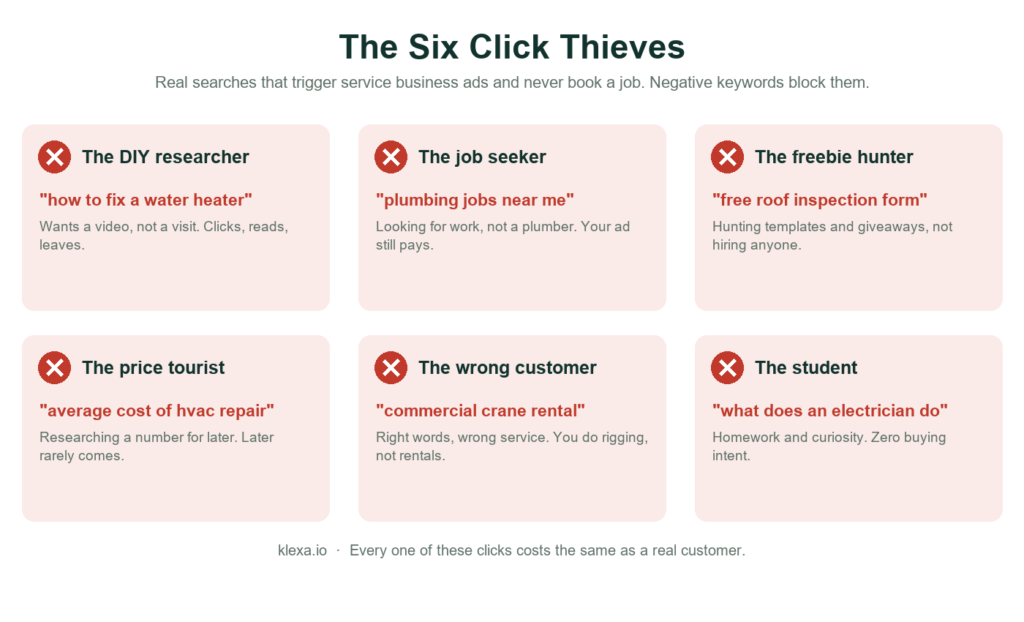
Audit enough accounts and the junk stops looking random. The same six people show up everywhere:
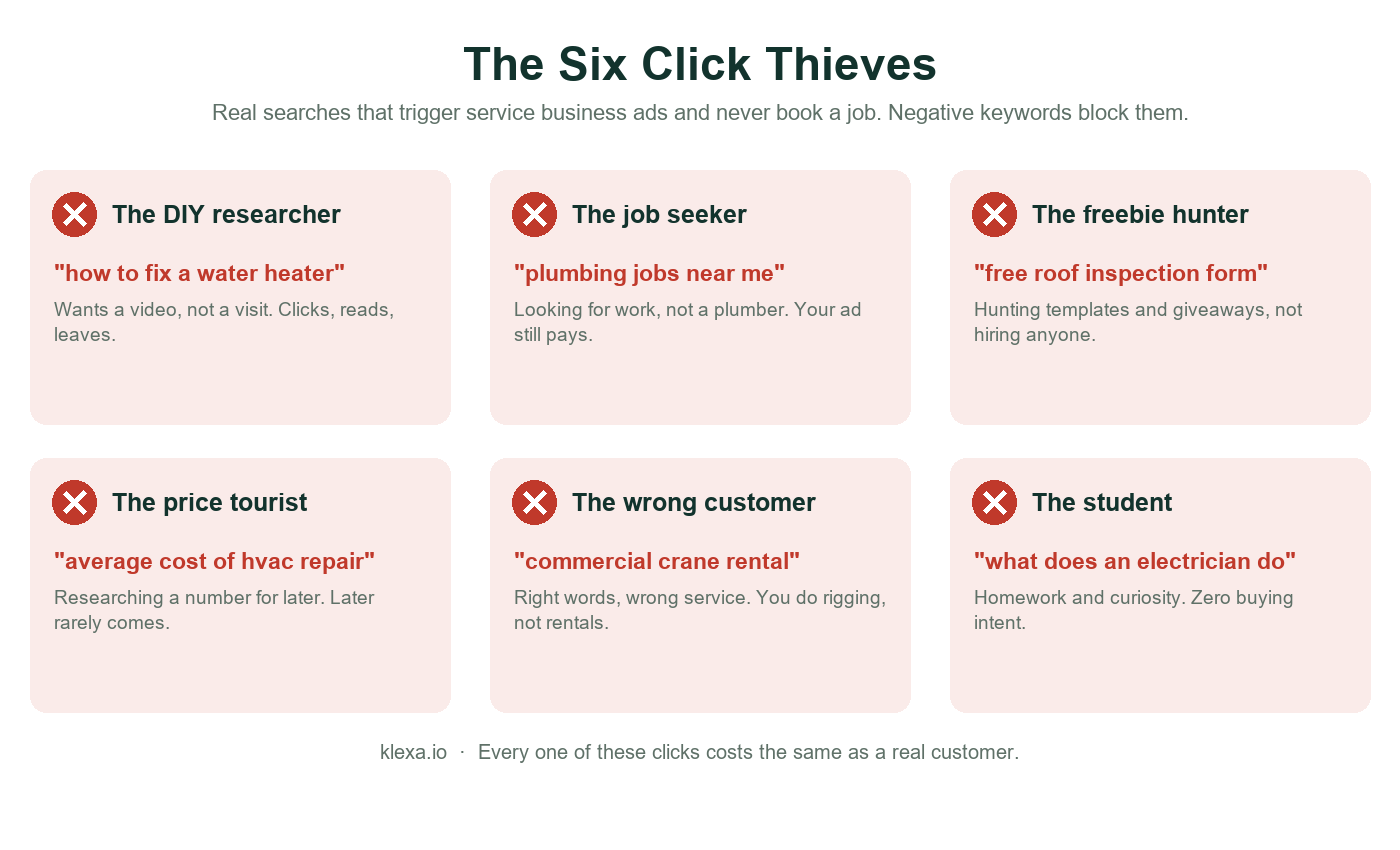
The names are ours. The searches are real. In the trades the job seeker is usually the worst offender, because plumber, electrician, and roofer are job titles as much as services. Employment searches hammer trade ads all day long. Jobs, hiring, salary, apprenticeship, resume. That cluster goes into every account we launch before the first ad runs, and it should be in yours tonight.
Finding your own thieves takes ten minutes
No guessing needed. Google logs every actual search that triggered your ad and what it cost you. Campaigns, then Insights and reports, then Search terms. Sort by cost. Read from the top down.
Fair warning: the first read is unpleasant. I’ve watched an owner find fourteen months of “hvac certification cost” clicks in one sitting. But this is the rare Google Ads fix that needs no budget, no designer, no learning phase, nothing. You find the junk, you block the junk, the spend comes back next month.
Adding them without breaking anything
Two clicks to add a negative. The thought behind it is the part that matters, because negatives follow different rules than regular keywords and one rule surprises everybody: they don’t expand. No plurals, no misspellings, no close variants. Block “job” and “jobs” sails right through. You add both, manually. Yes, really.
How we set them up on client accounts:
- Phrase match for most things. A phrase negative like “near me jobs” kills every search containing that sequence without collateral damage.
- One shared list at account level, attached to everything. New campaign launches? It inherits the whole fence on day one instead of relearning every lesson.
- Careful with single common words. Blocking “free” feels obvious right up until you remember real buyers type “roofer free estimate” constantly. In the trades, free is how customers start conversations. So block “free course” and “for free,” and leave “free estimate” alone.
- Running Performance Max? It ignores your campaign negative lists. Google added account-level negatives that PMax does respect, and if you never set them, your fence has been protecting half your budget.
You can also overdo it
Some owners find this feature and go to war. Every search that hasn’t converted gets blocked, one-word broad negatives stack up, and six months on the account is starving behind its own wall. Here’s the thing though. A search that hasn’t converted yet and a search that can’t convert are different animals. “Water heater replacement cost” contains price tourists, sure, and it also contains a homeowner with a dead tank comparing two quotes tonight. Read the intent before you swing the axe.
Our rule: any time a good keyword’s volume dips after we’ve added negatives, we go looking for the one that’s too broad and loosen it. Takes two minutes a week. It has saved accounts.
The habit that actually does the work
A one-time cleanup decays. Searches drift, Google’s matching drifts, fresh junk arrives weekly. What holds is a short ritual, same day every week:
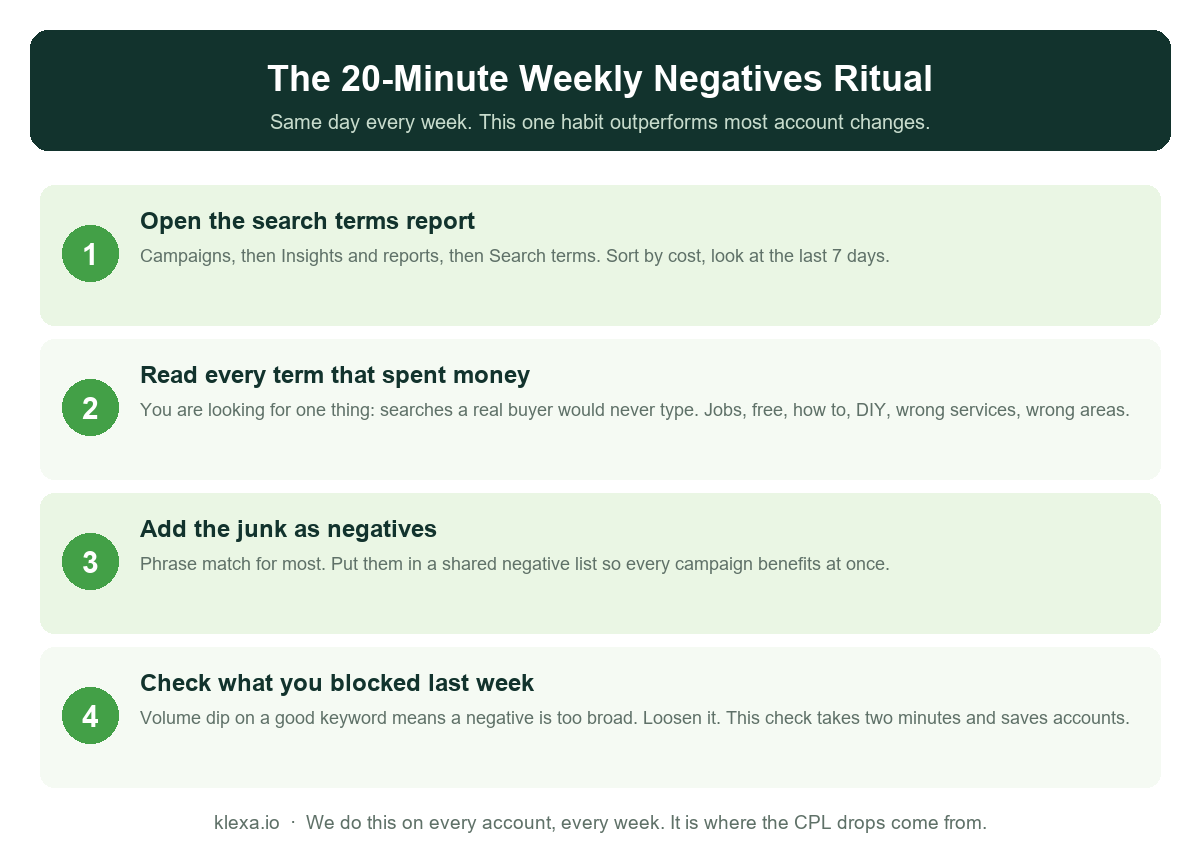
Twenty minutes, most weeks less. Boring? Completely. But our longest client, a crane and rigging company in New York, went from 273 dollars a lead to 197 while volume grew, and a real slice of that drop is just years of this weekly trimming compounding. Buffalo Plumbing got the employment and DIY wall before its first ad ever served, which is part of how a brand new account hit 92 dollars a lead in its first 90 days instead of spending month one sponsoring job seekers.
A starter list you can paste today
Your report will grow your real list. These blocks are universal enough that we add them to service accounts before launch, as phrase negatives in a shared list:
- Employment: jobs, job, hiring, careers, salary, salaries, apprenticeship, apprentice, resume, union
- DIY and learning: how to, diy, tutorial, course, courses, training, certification, license, exam
- Template hunters: free download, template, pdf, checklist, invoice example
- No-wallet research: what is, meaning, definition, wikipedia, history of
- Bargain-only: cheapest, second hand, used parts, wholesale
Notice what’s missing. No blanket “free,” for the estimate reason. No “cost” or “price,” because tonight’s buyers ask about cost too. And nothing trade-specific, since that part only your own report can tell you. A rigging company blocks “crane rental.” A crane rental company blocks “rigging service.” Same words. Opposite fences.
People ask how many negatives is normal. No magic number, but the shape is consistent: a few hundred in year one for a local service account, growing a handful a week, slowing as the fence fills in. Nine negatives after two years of spend means nobody’s managing the account. Four thousand one-word negatives means somebody managed it angrily. Both leak.
Two questions that always come up
Should I block competitor names? Depends what your data says, not what a blog says. If searches for a local rival’s name are triggering your ads and eating budget without ever converting, block them. But sometimes those searches convert fine, because a person typing a competitor’s name is often just a person shopping for the service who happened to remember one company. We have accounts where competitor terms produce the cheapest leads in the account and accounts where they produced nothing for a year. The search terms report settles the argument either way. Let it.
Do negatives affect Quality Score? Not directly, but the knock-on effect is real. Blocking irrelevant searches raises your click-through rate on what remains, since the people who see your ad are now mostly people it fits. Better click-through feeds better Quality Scores, and better Quality Scores quietly lower what you pay per click across the board. So the fence pays you twice. Once in junk clicks you stopped buying, and again in a small discount on the clicks you keep.
Do this today
Pull up your search terms report, last 30 days, sorted by cost, and just read. Ten minutes tells you whether you’ve got a drip or a flood, and which words to block first. And if the report raises more questions than it answers, our free Google Ads review call shows you what all your leaks add up to, in plain English. The junk stops the day you block it. The refund shows up next month.
Want this handled for your account? See how Klexa runs Google Ads management for service businesses, with no management fee until the account books you a job.
See where your ad budget is leaking
Free Google Ads review call for business owners. Plain English answers, no obligation.
September 2026 note: Google is auto-upgrading campaigns on the campaign-level broad match setting to AI Max, under which keywords are treated as broad by default. Why that matters most for high-ticket terms, and which switch restores control per ad group, is in our piece on the AI Max upgrade and dental implant keywords.